
External Connections for Xbox 360 Steering Wheel buttons and gear shifters
Adding six external phono plug connections for joypad buttons and gear shifter pads on the Xbox 360 wheel. These are to connect external gear shifters and hand brake systems.
Parts Required:
- Xbox 360 Steering Wheel
- Six phono sockets, screw mounting in the following colours: White, Black, Red, Blue, Green, and Yellow.
Stage 1: Removal of the Wheel circuit board.
Stage 2: Connect wires to the wheel circuit board
Connect approx 60cm lengths of wire to the board as shown in the images below: Internal Wheel Board wire connections

Wires Connected
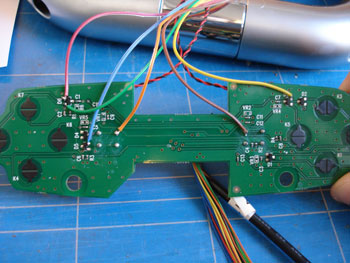
Reassemble the wheel and feed the new wires through the hole in the centre.
Stage 3: Connect the 3 ground wires to the radio circuit board.
These wires are very close together, be careful when soldering to the board. You could cut the wires and join further along if this would be easier.
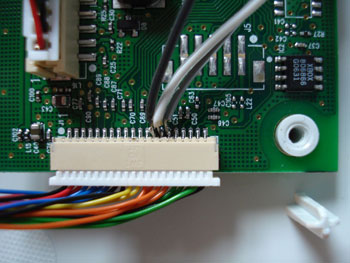
The wires on this connector are in the following order:
- Black
- Green
- Green
- Green
- Green
- Orange - Ground Point 3 - Gray Wire to connectors
- Orange - Ground Point 2 - White Wire to connectors
- Orange - Ground Point 1 - Black Wire to connectors
- Orange
- Yellow
- Yellow
- Black
- Black
- Blue
- Blue
- Blue
- Blue
- Red
- Red
- Black
Stage 4: Fix phono connectors in case
Drill 6 holes in the left grey side panel to take the phono sockets.
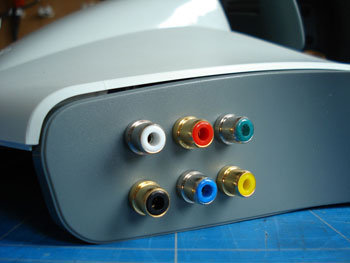
Stage 5: Solder wires to new sockets
Connect the new wires to the phono sockets
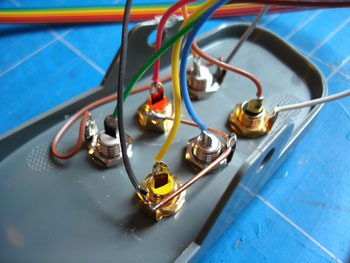
White Socket - Gear Shifter Paddle
Centre Connector: Orange Wire
Outside Connector: Grey Wire
Black Socket - Gear Shifter Paddle
Centre Connector: Brown Wire
Outside Connector: White Wire
Red Socket - Red Pad Button
Centre Connector: Red Wire
Outside Connector: Black Wire
Green Socket - Green Pad Button
Centre Connector: Green Wire
Outside Connector: Grey Wire
Blue Socket - Blue Pad Button
Centre Connector: Blue Wire
Outside Connector: Black Wire
Yellow Socket - Yellow Pad Button
Centre Connector: Yellow Wire
Outside Connector: Black Wire
Stage 6: Put it all back together
Reassemble the wheel and connect your gear shifter switches or handbrake to the new sockets.
Extra Notes: I have received reports that some people are having problems with the d-pad not working after doing this mod. I have tested this and have found that if the leads to the switches are too long (over 1m seems to do it) it can cause the d-pad to fail to work 100% of the time.

Comments